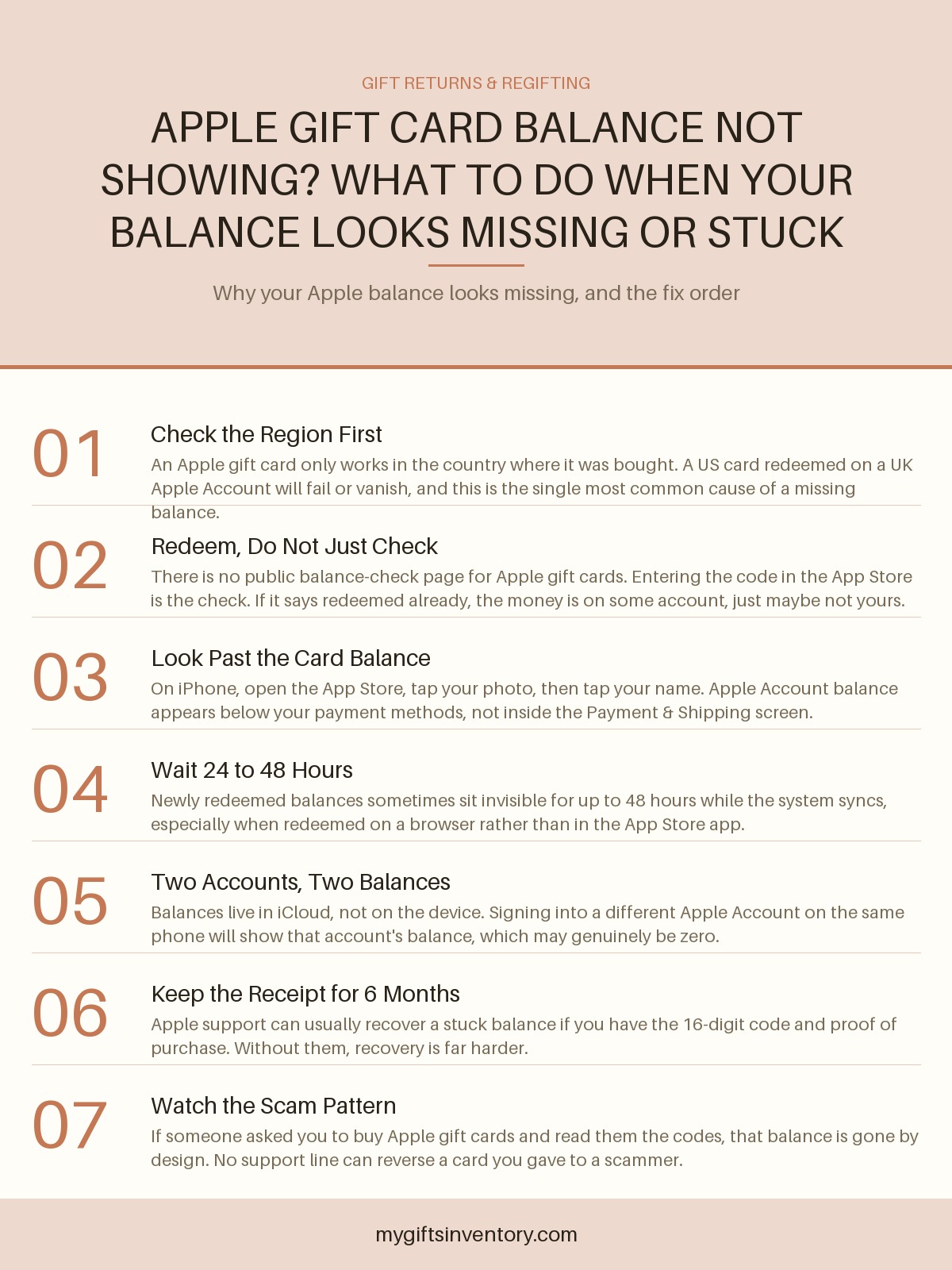
Apple Gift Card Balance Not Showing? What to Do When Your Balance Looks Missing or Stuck
You redeemed the card, the confirmation went through, and now your Apple balance shows $0.00. Here is the realistic order of things to check, why it usually happens, and how to get it fixed.
As an Amazon Associate, My Gifts Inventory earns from qualifying purchases. We only recommend products we'd genuinely consider buying ourselves.
You scratched off the back, typed in the code, saw the confirmation, and now your Apple Account shows zero. Or worse, you never got a confirmation at all and the card just sits there refusing to redeem. Either way, this is one of the more annoying gift card situations out there, because Apple does not offer the thing every other retailer offers: a simple public balance check page. There is no "enter your code, see your money" tool. Which is exactly why a missing or stuck balance feels so much more alarming with Apple than it does elsewhere.
The good news is that the overwhelming majority of "missing" Apple balances are not missing at all. They are on a different account, in a different region, or simply not where you are looking. Here is the realistic order to check things, and what to do when it genuinely is broken.
First, Understand How Apple Balances Actually Work
Apple gift cards do not work like a Starbucks card or a Visa prepaid card. There is no running number you can watch go down. When you redeem an Apple gift card, the value does not become a "card balance," it becomes an Apple Account balance, which is the same pot of money that Apple Card cash back and Apple Account credit deposits go into. From that point on, the plastic card is dead. It is now a line item on your Apple Account.
Two consequences fall out of that, and both explain most panicked searches:
You cannot check an Apple gift card balance without redeeming it. Any site claiming to offer an Apple gift card balance check is either a scam or is just redirecting you to the redemption flow. If you want the specific walkthrough for entering a code and confirming what landed, our guide to Apple/iTunes gift card balance and how to check it covers the exact screens and the order they appear in.
Balances are tied to an Apple Account, not a device. This trips up families constantly. If Mom redeems a card while signed into the family iPad under her own Apple Account, the balance lives with her Apple Account. If you then pick up that same iPad signed into your account, you will see your balance, which may legitimately be nothing. The money is not gone. It is just in a different account.
The Five-Second Check: Where the Balance Actually Hides on iPhone
Before assuming anything is wrong, confirm you are looking in the right spot, because Apple buried it. On an iPhone or iPad:
On iOS
Open the App Store, tap your profile photo in the top right corner, then tap your name at the very top of the next screen. Your Apple Account balance appears on that account overview page, usually just below the email address. It is not inside Payment & Shipping, and it is not under Subscriptions. People miss it because it sits on a page they normally scroll past.
On a Mac
Open the App Store, click your name in the bottom left, and look at the Account page. Same idea.
If no balance line appears at all
That usually means the account has never had a balance, not that one disappeared. Apple hides the line entirely at zero in some versions. So if you redeemed a card and see no balance line two days later, that is a real flag worth chasing.
The Most Common Cause: A Region Mismatch
We would bet on this one before almost anything else. Apple gift cards are region-locked, and the lock is hard. A card bought in the United States can only be redeemed on a US Apple Account. A card from the UK needs a UK account. A card from Canada needs a Canadian account.
Here is the cruel part: the redemption flow does not always stop you cleanly. Sometimes it accepts the code, spins, and then errors out with something vague like "This code is not valid" or "Cannot redeem." Sometimes it half-processes and nothing shows up. Either way, the money is fine, it is just sitting on a card that will never unlock the region you are signed into.
This happens constantly with cards bought on vacation, cards ordered from a reseller who shipped a foreign version, and cards gifted by relatives in another country. If the card's packaging or back-of-card fine print mentions a country other than the one on your Apple Account, stop troubleshooting and start planning to redeem it on an account in the right region, or ask the buyer to return it where they bought it.
"It Says Already Redeemed" Is a Different Problem
If the code comes back as already redeemed, that is not a balance-display problem. That means the value was claimed by somebody, and you need to figure out who.
Start with the obvious: did you or someone in your household redeem it months ago and forget? Check every Apple Account that has ever been used on your devices by signing in and looking at that balance line. The account that redeemed it will show the balance or, if it has been spent, a transaction history showing purchases against it.
If nobody in the household redeemed it, then you are in lost-or-stolen territory. This is the scenario that matters most for gifting, so we will say it plainly: if you bought this card for a gift and handed over the code before the recipient could redeem it, the recipient may be the one who redeemed it, or someone who photographed the back at the store may have. Keep reading for how to raise this with Apple.
When the Balance Is Genuinely Stuck: What Apple Support Can Do
Here is where the balance can actually be recovered, and it comes down almost entirely to documentation.
- Bring the physical card. The 16-digit code on the back matters. Apple support can look up a card's redemption history from the code.
- Bring proof of purchase. A store receipt, an emailed order confirmation, or a bank or credit card statement line showing the purchase. This is the single difference between a recovered balance and a dead end.
- Know which Apple Account you expected it on. Support will ask. Give the exact email address, not "my iCloud."
- Be ready for a wait. Gift card investigations typically take several business days, sometimes longer around the holidays. Do not expect a same-day answer.
One realistic warning: Apple is good at recovering balances that failed for technical reasons and much less able to help with balances that were redeemed by a third party. If a card was drained by someone who guessed or purchased the code, Apple's position is generally that the transaction was authorized, and the card's value is gone.
If You Are the Giver, Not the Receiver
A surprising share of people searching this are actually the person who gave the card, checking whether it worked. That instinct is right, and worth building into your gifting habits.
The safest version of an Apple gift card gift is a digital one sent directly to the recipient's Apple Account email, because it links to the right account and the right region automatically. It also gets you an automatic delivery record, which is exactly the documentation you would need if anything went wrong.
If you bought a physical card, do two things: keep the receipt, and do not photograph or share the code. If you want to keep the "surprise in an envelope" feel, consider pairing the card with a small physical gift so there is something to unwrap even if the balance takes a day or two to land. We keep a running list of gift exchange ideas under $30 that work well as a physical companion to a card, and if the recipient is a kid who is getting the card specifically for a game, our Nintendo Switch 2 accessory picks pair nicely with eShop credit without duplicating it.
How to Tell a Genuine Glitch From a Scam
Two patterns look similar and are not.
A genuine glitch looks like this: you have the physical card, you have the receipt, the code is unused by anyone you know, and Apple support can see the card in their system. Time and documentation fix this.
A scam looks like this: someone contacted you (a boss, a love interest, a "tech support" agent, a marketplace buyer) and asked you to buy Apple gift cards and read them the codes. Or you bought a discounted card from a third-party reseller and the code was already dead on arrival. In these cases the balance is not stuck, it is spent, and no support agent can claw it back. The FTC has warned about gift card scams for years specifically because gift cards are irreversible by design, which is what makes them so attractive to fraudsters.
One quick sanity test: if anyone is pressuring you right now to go buy Apple gift cards for any reason, stop. There is no legitimate scenario in which a government agency, a utility, a landlord, or an employer needs to be paid in Apple gift cards.
Quick Reference: What to Do, In Order
- Confirm you are signed into the correct Apple Account, then check the App Store account page for the balance line.
- Check whether the card's region matches your account region.
- Wait 24 to 48 hours if you just redeemed, especially on a web browser.
- Try redeeming again to see what error comes back. The error text tells you which of the above problems you have.
- If it says already redeemed, check every account in the household before assuming theft.
- Contact Apple support with the physical card, the receipt, and the target account email.
- If the card was ever shared with a stranger, treat it as a scam, not a glitch.
Gift Ideas to Go With This



Want more ideas? Browse our full guide: 20 Best Gifts Under $100 (2026): Thoughtful Picks They'll Actually Use
Frequently Asked Questions
Why is my Apple gift card balance showing zero after I redeemed it?
The two most likely reasons are that the card was redeemed on a different Apple Account than the one you are checking, or that the card's region does not match your account region. A smaller third possibility is a sync delay of up to 48 hours after redemption. If none of those fit and the code was never shared with anyone, contact Apple support with your receipt.
How do I check my Apple gift card balance without redeeming it?
You cannot. Apple does not offer a standalone balance check for unredeemed cards. The only way to see the value is to redeem the code, at which point it becomes an Apple Account balance visible in the App Store account screen. Any third-party site offering an Apple balance check should be treated as a phishing attempt.
Can I use a US Apple gift card on a UK Apple Account?
No. Apple gift cards are locked to the country where they were purchased, and there is no way to convert or transfer between regions. If you have a card from the wrong region, the options are to redeem it on an account in the correct region or to return it to the retailer where it was bought.
What if the card says it was already redeemed but I never used it?
First check every Apple Account that has been used on your devices, since a family member may have redeemed it. If no account shows the balance and you still have the physical card and the receipt, Apple support can investigate the redemption history. If the code was ever shared, photographed, or sold to you by a third party, treat it as lost, because Apple generally cannot reverse a redemption made by someone else.
How long does it take for a redeemed Apple gift card balance to appear?
It is usually instant when redeemed inside the App Store app on an iPhone or iPad. Redemptions done through a web browser sometimes take up to 24 to 48 hours to reflect on the account. If a full two business days pass with no balance line and no transactions, that is the point to contact Apple support.
Looking for an Actual Gift Instead?

Gift Sets We Love Right Now
Every item picked, priced and linked, ready to buy.

More Gift Advice